
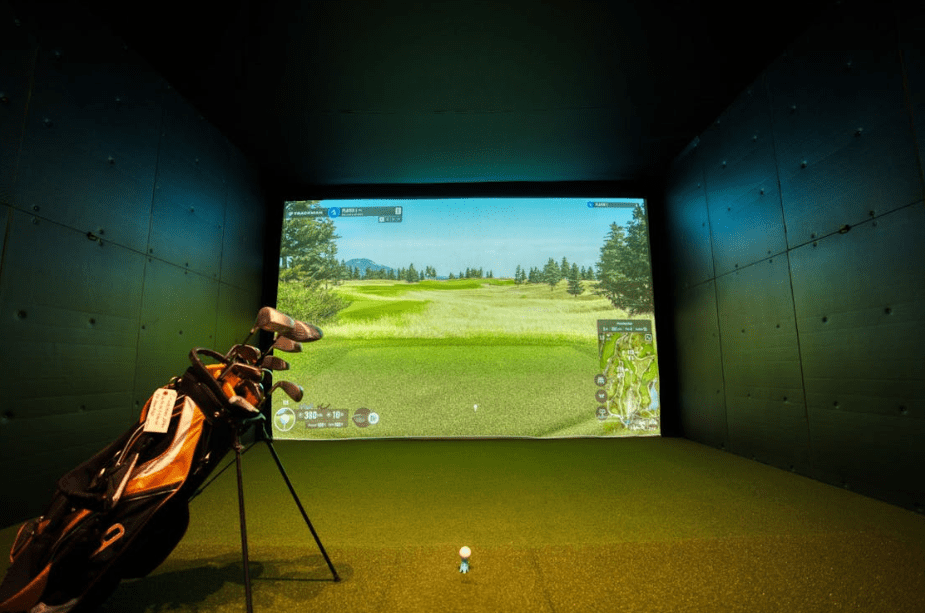
The most honest tester of a swing is ball flight, spin, and strike location. Modern simulator systems read those details with high speed cameras and radar. They turn a spare room into a repeatable practice space with clear feedback loops.
That blend suits both golfers and gamers who value data, modes, and progression. If you want a place to build skills on your schedule, look at golf simulators for training.
The right package gives you accurate numbers, smart practice games, and useful replays. It also fits neatly into the game room you already love.
Photo by swingzone swingzone
See Honest Shot Data
Most players guess at what a ball did after impact and why it moved. A simulator removes guesswork by measuring launch angle, ball speed, club path, and face angle. Those numbers reveal cause and effect, which shortens the learning curve.
Start with two clear goals for a practice block and track them by session. Examples include raising smash factor or tightening dispersion at a set carry yardage. Save your sessions, then compare weekly trends against the same test grid.
As you collect data, use basic motor learning ideas like frequent feedback and spaced practice. Short, focused sets are better than one long endless grind. A useful primer on feedback and practice explains why frequent results feedback speeds skill gains.
Practice With Game Modes
Good simulators ship with challenge modes that feel like familiar game playlists. Skills tests set targets at different distances and track miss patterns with simple visuals. Combine those with timed sessions to keep your heart rate and focus sharp.
Mix blocked and random practice to mirror how shots appear during a round. A simple pattern is three wedge distances, then a mid iron, then a fairway wood. Random order builds adaptability and keeps your tempo honest under light pressure.
Use scoring ladders and leaderboards if your software supports them. Friendly rivalry adds motivation without needing a full group at the range. Save each attempt under the same profile to build a clean record of progress.
Sharpen Short Game And Putting
Many golfers swing well with full shots, yet leak strokes inside fifty yards. A simulator lets you practice chips, pitches, and putts with instant roll and face data. That keeps contact and distance control front and center in each rep.
Set up a simple three zone ladder for wedges and treat it like a mini game. Aim for carry windows at ten, twenty, and thirty meters with tight tolerances. Track your average miss long and short to reveal contact issues or loft choices.
For putting, match the simulator stimp to your usual course speed at home. Work start line first, then speed, then green reading on virtual breaks. Consistent putter face control and centered strikes shave strokes without changing equipment.
Rehearse Course Decisions
Simulators let you rehearse tee shots on layouts you plan to play next season. You can test lines, club choices, and layup spots while tracking dispersion in meters. That turns a practice hour into a strategy session that pays off later.
Run a nine hole session with a defined plan before you start. Choose one conservative line, one assertive line, and one balanced choice on three holes. Compare scoring averages across those paths, then commit to the winner on course.
Add pressure by playing consequences for mistakes, like a one shot penalty for water. Simulated stress helps you learn safer misses and faster recoveries. The same approach works well for match play prep and scramble roles with friends.
Set Up The Right Space
A solid training setup does not need a warehouse or a tour budget. Measure ceiling height, room width, and depth with care, then plan your enclosure and screen. Ensure safe swing clearance for your longest club and a clean projector throw.
Then match a launch monitor and software to your goals and hardware. If you like detailed club data, prioritize a unit with path and face readings. If you want smooth visuals on a gaming rig, confirm frame rate and input latency.
Consider the people who will use the space and plan simple profiles for each user. Look for modes that scale from beginner to advanced without confusing menus. Sound control, lighting, and mat feel also matter more than flashy extras.
Practical Setup Checklist
- Confirm room dimensions, safe swing arc, and net or screen clearance.
- Choose a launch monitor with the ball and club metrics you need.
- Check projector throw distance and expected image size at your wall.
- Map software modes to your training plan and gaming preferences.
- Save profiles, targets, and test grids for clean week over week comparisons.
Train Often, Stay Fresh
Golf asks for volume if you want steady improvement across the season. Simulators make that volume possible without long drives or daylight limits. You can log hundreds of strikes with far less joint stress than hard turf.
Plan short, frequent sessions that respect recovery and grip health. Three twenty minute blocks across a week often beat one marathon that leaves you sore. This schedule also preserves focus and avoids the sloppy swings that stick.
Steady practice works best when you can repeat it without burnout. Keep water nearby, rotate clubs, and stop one set before fatigue. Your consistency will mean more than any single hard session.
Putting everything together, combine data, game like modes, and simple routines. Keep the tech setup friendly, then measure progress against a small target list. Over several weeks, those scores begin to move in the right direction.
Set a weekly plan, keep sessions short, and use modes that mirror real play. Track two or three metrics, not ten, so you can act on what you see. Then save and review, just like you would with clips and match stats from a favorite title.
Photo by Kindel Media
Final Thoughts
Golf simulators turn instinct for systems, stats, and modes into steady skill gains. Choose a setup that fits your space and log short sessions you can repeat. Focus on ball flight, strike quality, and decisions, then review your saved sessions. The scorecard will reflect steady work long before you change your driver or ball.





 SuBZeRO2K
 Spotify
 Anchor
 iTunes