
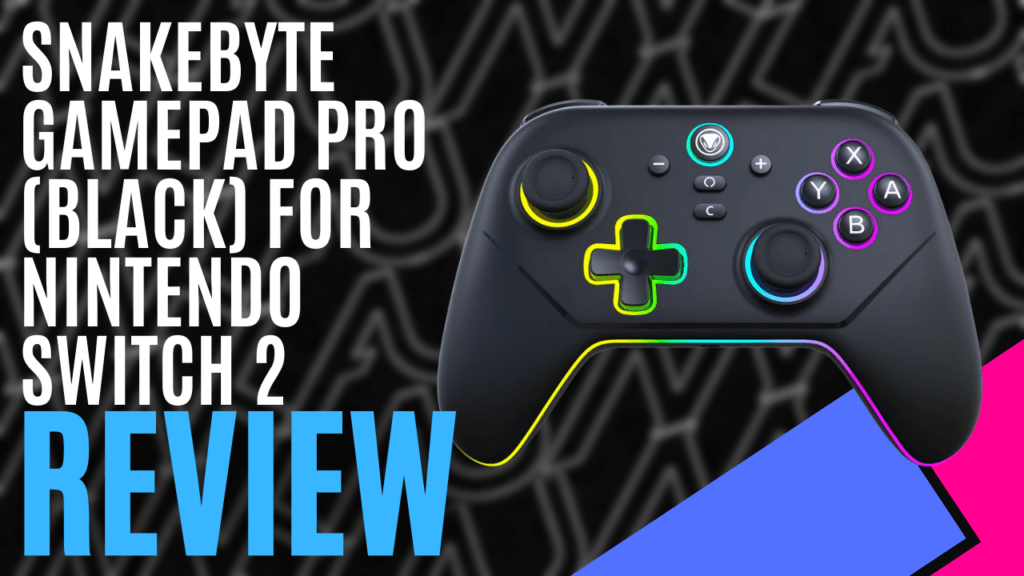
For the past 25 years, Snakebyte has been designing third-party gaming hardware and accessories, selling over 30 million products to date. Thanks to the folks at Snakebyte, we got to have an early hands-on with one of their latest products, the Snakebyte Gamepad PRO S2, which is now available in parts of Europe and coming soon to Australia.
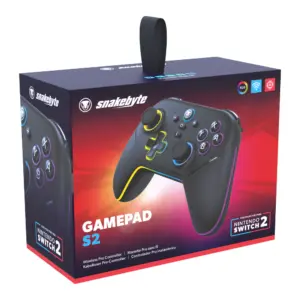
The Snakebyte Gamepad PRO S2 comes neatly packaged in a small box, with information on the back. Inside includes the controller itself, USB-C dongle with a USB-A adaptor, a USB-C charging cable, and a quick start guide. The Snakebyte Gamepad PRO S2 is designed for the Nintendo Switch 2 and also works with the original Switch, Switch Lite, and Switch OLED.
The Snakebyte Gamepad PRO S2’s design looks and feels similar to the Switch 2 Pro Controller, with all the same buttons plus some additional features. It has a matte black finish, and the grips have some texture to prevent the controller from slipping in the hands. It also has RGB lights around the controller’s frame, face buttons, analog sticks, and directional pad.
The RGB lights add some style to the controller, but can be switched off for those who prefer it or want to preserve battery life. The controller has a 1000 mAh rechargeable battery, providing up to 12 hours of continuous gaming.
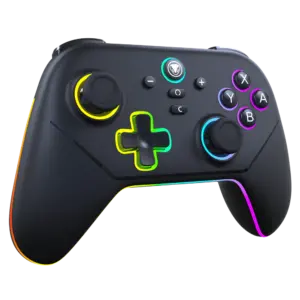
Some of the buttons are labelled differently. The face buttons are mainly the same, but the shoulder buttons, L, R, ZL, and ZR are instead L1, R1, L2, and R2, and the rear buttons, GL and GR, are instead M1 and M2. This could cause confusion when checking the controls in a game and looking at your controller, especially for those less experienced with a Switch console, and even worse during a quick-time event that requires fast reactions. Of course, for more experienced players, this is less of an issue as they rely more on muscle memory.
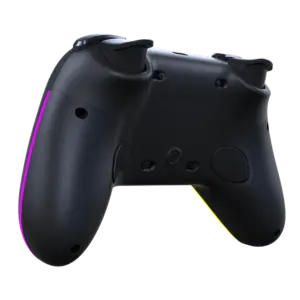
Behind the controller are some unique features that the official Switch and Switch 2 Joy-Cons and Pro Controllers don’t have: sliders and a turbo button. The upper sliders can switch the L2 and R2 buttons between analog and digital, while the Switch controllers’ ZL and ZR buttons are digital only. It’s great to have the option of either having more range when pushing those buttons or just a simple press to perform the actions. The lower sliders can lock the M1 and M2 buttons so they’re assigned to something; this helps prevent accidental presses and ruining your game.
The turbo buttons allow players to perform rapid button taps by simply holding them down. Certain games require rapid button presses, such as quick-time events and sports, especially track-and-field games like the Olympic video games. This makes it a handy feature for those who want to achieve success more easily, especially for those who cannot press buttons fast enough or have physical disabilities.
Stick drift has been a common problem with modern controllers, but the Snakebyte Gamepad PRO S2 uses hall effect technology to prevent it, so you don’t have to buy a new one. Whether this feature will work or not in the long term, only time will tell.
Performance-wise, the Snakebyte Gamepad PRO S2 works excellently. I tried it in various game genres such as action-adventure, side-scrolling platformers, and racing games, and it felt natural with no noticeable input delay. For fighting games, the directional pad doesn’t feel ideal for performing certain moves, but with enough practice, those moves can be performed with ease. I tried the turbo button in Mario & Sonic at the Olympic Games Tokyo 2020, and it was certainly a guilty pleasure to sprint at maximum speed just by holding down the A button.
Unfortunately, it doesn’t seem to have any motion controls. So, for those who prefer to move their control stick to aim or steer a vehicle in games like Splatoon or Mario Kart, they’re out of luck. It seems unlikely that it can be added via a firmware update if the controller isn’t designed to have it, but we’ll see if it might be included in the future.
The Snakebyte Gamepad PRO S2 can connect wirelessly via Bluetooth or via a USB-C dongle, and it can be wired with the charging cable, but it will need occasional updates to ensure it continues to connect to a Switch console. On the official Snakebyte website, free software can be downloaded to keep the controller’s firmware up to date, ensuring it still connects to the Switch 2 each time it updates its own firmware. To do this, users can simply plug in the USB-C dongle into a PC and update away.
At the moment, there is no Australian price listed, but it should be around $79 if it matches the European price. This is still a much cheaper alternative to the Switch 2’s $119 price tag, performing just as well and offering some unique features. It feels great in the hands, has style, and the turbo button can make certain games easier to play. The Snakebyte Gamepad PRO S2 is a worthwhile alternative coming soon to Australia.
Technical Specifications
- Compatibility: Nintendo Switch 2
- Connection: Wireless (Dongle included)
- Battery: 1000 mAh
- Dimensions: 156mm x 60mm x 104mm
- Weight: 222g
The Good
- Cheaper alternative that performs just as well and offers more for less
- Feels incredibly responsive with no noticeable input delay
- Comfortable in the hands
- RGB lights give it style
- Turbo button makes rapid taps easier
The Bad
- Different button labels can cause some confusion
- No motion controls






 SuBZeRO2K
 Spotify
 Anchor
 iTunes