
So, you’re looking to dive into the epic, high-stakes, stylish world of Valorant? Awesome! Riot Games’ tactical shooter has taken the gaming scene by storm, and for good reason.
But before you start practicing those perfect headshots and agent ability line-ups, there’s one big question: can your current PC setup handle the heat?
Let’s cut through the noise and lay out precisely what you need to run Valorant, from just getting in the game to absolutely dominating the server.
The good news? Valorant is famously well-optimized, meaning you might not need a supercomputer to join the ranks of Radiants.
Why Valorant’s Specs Matter
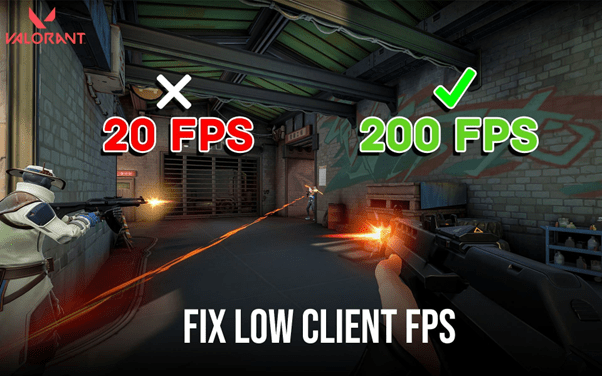
In a game where a millisecond can mean the difference between an easy win and a frustrating round loss, your system’s performance is essential.
We’re not just talking about whether the game runs; it’s about how smoothly it runs, and higher frames per second (FPS) mean a more fluid picture, making it easier to track enemies and react instantly.
Similarly, lower system latency ensures your mouse clicks and keyboard presses translate to in-game actions without a noticeable delay. Think of it as the difference between a tailored suit and something off the rack. Both cover you, but one just feels and performs a whole lot better.
For a competitive title like Valorant, understanding these requirements is your first step towards peak performance!
What Your Rig Needs for Valorant
Riot Games has done a stellar job ensuring a wide array of machines can run their flagship shooter. Whether you’re rocking an older setup or a top-tier beast, there’s likely a place for you.
Minimum Specs to Get You in the Game (30 FPS)
If you’re just looking to jump in, learn the agents, and enjoy the core Valorant experience, the barrier to entry is refreshingly low. These settings are designed to achieve a playable 30 FPS, which is sufficient to understand the maps and abilities.
- Operating System: Windows 7/8/10/11 (64-bit is a must)
- CPU: Intel Core 2 Duo E8400 or AMD Athlon 200GE
- RAM: 4 GB
- GPU: Intel HD 4000 or AMD Radeon R5 200
- VRAM: 1 GB
Think of this as your reliable sidearm. It’ll get the job done and let you experience the thrill of the fight. You won’t be pushing graphical boundaries, but you’ll be in the game.
Recommended Specs for Smooth, Competitive Play (60 FPS)
For most players aiming to climb the ranks and enjoy a responsive gaming experience, the recommended specs are where you should be looking. Achieving a consistent 60 FPS is widely regarded as the gold standard for smooth gameplay, making enemy movements more straightforward and your actions more precise.
- Operating System: Windows 7/8/10/11 (64-bit)
- CPU: Intel i3-4150 or AMD Ryzen 3 1200
- RAM: 4 GB
- GPU: NVIDIA GeForce GT 730 or AMD Radeon R7 240
This tier is the sweet spot, a balance of accessible hardware and a noticeably improved visual and gameplay experience. It’s here that your skills can genuinely start to shine without your gear holding you back.
Dominating the Server with 144+ FPS
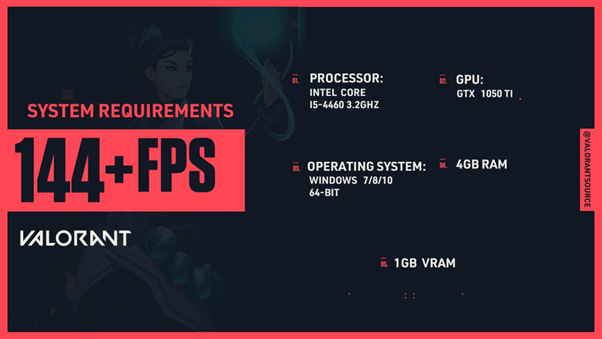
If you’re serious about competitive Valorant, aiming for top ranks, or simply demand the smoothest visuals possible, then targeting 144 FPS or higher is the goal. This level of performance, paired with a high-refresh-rate monitor, offers the ultimate competitive edge, providing maximum visual information and responsiveness.
- Operating System: Windows 7/8/10/11 (64-bit)
- CPU: Intel Core i5-9400F or AMD Ryzen 5 2600X
- RAM: 4 GB
- GPU: NVIDIA GeForce GTX 1050 Ti or AMD Radeon RX 570 (Note: Original data listed R7 370, but RX 570 is a more common equivalent/step-up often cited for this tier and aligns better with GTX 1050 Ti performance for high FPS)
This is the setup that lets your reflexes take center stage. Every flick, every peek, every ability deployment feels instantaneous. It’s the F1 car of Valorant setups built for speed and precision.
Valorant System Requirements at a Glance
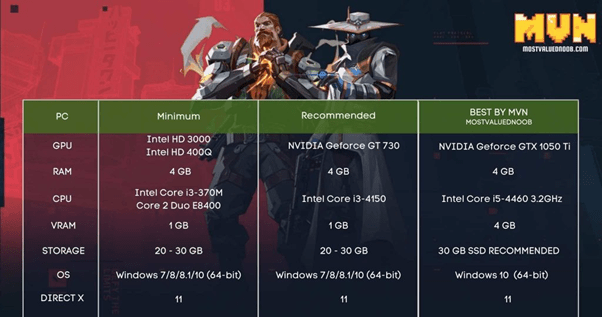
To make things even more straightforward, here’s a quick rundown of what you need:
| Tier | CPU | GPU | RAM | OS | Storage | Target FPS |
| Minimum | Intel Core 2 Duo E8400 / Athlon 200GE | Intel HD 4000 / AMD Radeon R5 200 | 4 GB | Windows 7/8/10/11 64-bit | 30 GB | 30 FPS |
| Recommended | Intel i3-4150 / AMD Ryzen 3 1200 | NVIDIA GeForce GT 730 / AMD Radeon R7 240 | 4 GB | Windows 7/8/10/11 64-bit | 30 GB | 60 FPS |
| High-End | Intel Core i5-9400F / AMD Ryzen 5 2600X | NVIDIA GTX 1050 Ti / AMD Radeon RX 570 | 4 GB | Windows 7/8/10/11 64-bit | 30 GB | 144+ FPS |
Other Details to Keep in Mind
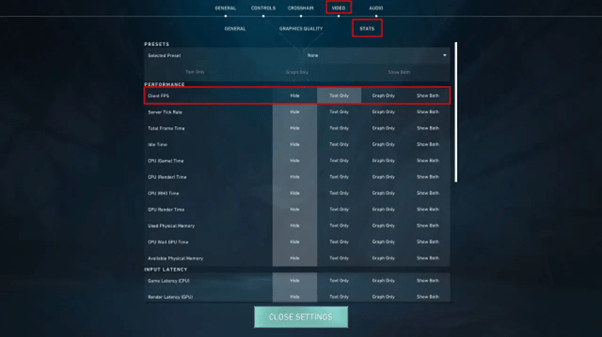
While CPU, GPU, and RAM are the headliners, a few other details are worth noting:
- Operating System: While Valorant supports Windows 7, 8.1, 10, and 11 (all 64-bit), it is generally recommended to run the latest version of Windows (10 or 11) for optimal performance, security, and compatibility with the latest drivers.
- Storage Space: You’ll need around 30 GB of free disk space. Given how games tend to grow with updates and new content, having a little extra room is always a good strategy. An SSD (Solid State Drive) will also significantly speed up loading times compared to a traditional HDD (Hard Disk Drive), allowing you to get into matches faster.
- A Note on Optimization: Riot Games consistently works on Valorant’s performance. This means that even if your system is on the lower end, you might still find the game surprisingly playable due to their ongoing efforts.
Is Your Setup Ready for the MVP?
Knowing these requirements is the first step to ensuring you have the best possible Valorant ranked experience. If your current rig meets or beats these specs, you’re good to go. If you’re looking to upgrade, focus on the components that will provide the most significant increase in FPS for your budget. Often, this means prioritizing the graphics processing unit (GPU) and then the central processing unit (CPU).
Valorant’s accessibility is a massive part of its charm, inviting a vast community of players into its meticulously crafted arenas. Whether you’re aiming for casual fun or esports glory, ensuring your PC is up to the task means you can focus on what truly matters: hitting your shots and outplaying the opposition.
So, take a look at your machine’s internals. Are you geared up for 30 FPS, a solid 60 FPS, or are you ready to blast past 144 FPS? Whatever your setup, the world of Valorant awaits!





 SuBZeRO2K
 Spotify
 Anchor
 iTunes